The client has a page of its own. abdallah-shehawey.github.io/whatsapp-desktop is the short version: what it is, what every switch in it does, and the install, update and removal commands for Fedora, Debian and Arch, ready to copy. What follows here is the long one — how it is put together, and why.
WhatsApp has no Linux client. What we have instead are wrappers: a window with a
browser engine inside it, pointed at web.whatsapp.com. That is a perfectly
reasonable design — it is the same client WhatsApp serves to Chrome, so nothing
about it can get your account banned.
whatsapp-desktop is mine. It is the second one I wrote: the first,
whatsapp, is 128 KB of C against GTK4
and WebKitGTK, and it still exists and still works. This one starts from
Chromium instead, and keeps the parts of the first that were never about the
engine.
What it is
- WhatsApp Web in a window of its own, with no address bar and nothing else in it.
- Voice and video calls, and screen sharing. Camera, microphone and screen capture over WebRTC, with the permissions granted to WhatsApp's own origin and to no other, so nothing asks first. PipeWire under Wayland.
- In the tray. Closing the window keeps the client connected and messages
arriving.
Ctrl+Qand the tray's own Quit are the two ways out, and it can start hidden at login. - A font for English and a font for Arabic — a family, a size and a real bold or italic face for each, each with its own switch, in a window of their own. Left alone, it draws the page in your desktop's font and follows it as it changes.
- One notification per message, with the sender, the text and the sender's picture, a click that opens that conversation and brings the window back, and a withdrawal the moment you read it — on your phone as readily as here.
- It moves better than the browser it is: the conversation composited on the GPU, a wheel notch animated rather than jumped, the side panel sliding, and the reply bar and the messages above it rising as one piece.
- It says when a newer version is out — a check against the latest release, once a day and on demand, that never installs anything itself.
- Two windows of switches and no text editor. Dark or light follows the desktop,
links open in your browser, every download asks where to go,
Ctrl+/-/0zoom and the window size is remembered.
What it is built on
Electron 40, which is Chromium plus Node in one process tree. The page is WhatsApp's own; everything I wrote lives around it:
src/main.js         the window, the session, the tray, the switches
src/preload.js      the bridge — the page's world on one side, IPC on the other
src/page/store.js   what WhatsApp's own model layer is asked, in the page
src/page/media.js   stickers, fetched whether or not photos are
src/page/inject.js  the chat-list watcher, the notification shim, the reply-bar motion
src/notify.js       the banner policy
src/style.js        the user stylesheet — the font, and the room Arabic needs
src/fonts.js        the catalogue, and the fontconfig file the client writes itself
src/settings.html   the switches
src/fonts.html      a family, a size and a weight, per script
src/about.html      the version, and whether a newer one is out
src/window.css      the look those three share
src/update.js       asks GitHub for the latest release, and compares
src/tray.js         the menu — and src/tray-sni.js, the StatusNotifierItem behind it
src/config.js       ~/.config/whatsapp-desktop/whatsapp-desktop.conf
src/autostart.js    XDG autostart manager
It ships its own copy of Electron, so it needs no browser installed — 245 MB on
disk, 76 MB as a .deb. Chromium carries 55 UI translations and this
application shows no Chromium UI to translate, so only en-US and ar are
kept.
Three windows of its own
Everything the client can be told, it can be told without a text editor. There
are three windows — all of them the client's own pages rather than the desktop
toolkit's, all three sharing one stylesheet, and all three opened from the same
four-item tray menu. Everything in them lands the moment you set it and is
written to ~/.config/whatsapp-desktop/whatsapp-desktop.conf. Only a change of
font family ever asks for a restart, and only because a fontconfig document is
read once, before any of the application's own code runs.
Settings
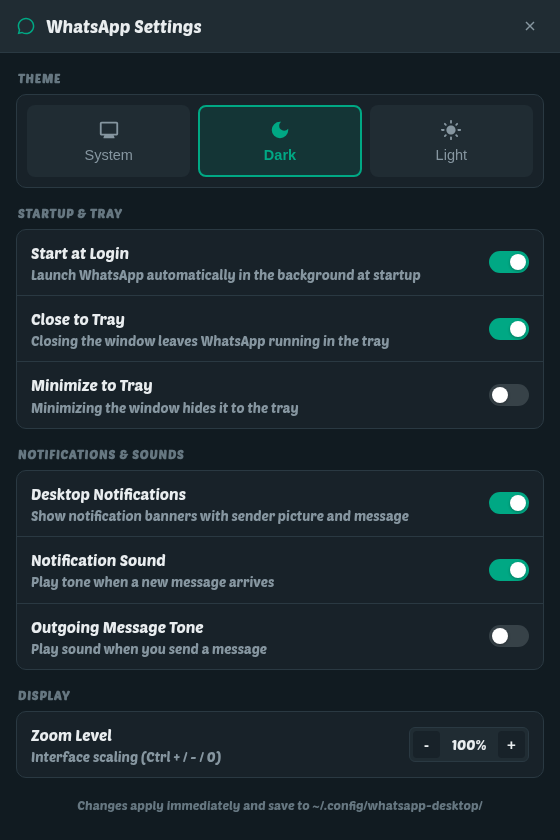
Ctrl+,, or the tray. Four groups of switches and nothing that needs
explaining twice:
- Theme. System, Dark or Light. System tracks the desktop live —
prefers-color-schemechanges under the page without a reload. - Startup and tray. Start hidden at login; whether closing the window sends it to the tray, and whether minimising does too. Minimising does not, by default: minimising is not closing.
- Notifications and sounds. The banners, the tone when a message lands, and the tone for a message you send — the last off by default, since it is already on screen with a tick under it.
- Zoom. The whole interface, the same as
Ctrl+/-/0, and remembered between runs like the window size.
There is no font row here any more. There used to be, and it grew until it deserved a window of its own.
Fonts
A family, a size and a weight for Latin and for Arabic — each script on its own, each with its own switch, and each with a preview line drawn in what you just picked. The section below is what is behind it, and the window itself is the picture there.
About
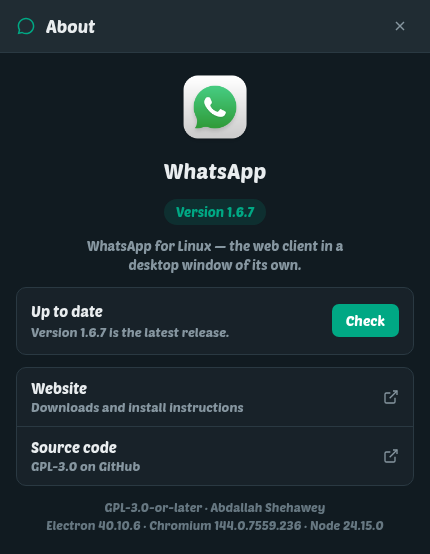
The version running, and the versions of Electron, Chromium and Node underneath it — the first thing anybody asks for in a bug report, and the one thing on that window that can be selected and copied.
Beside them, a check against the latest GitHub release. The client also looks
once a day by itself, and when there is something newer the tray item names it
rather than staying silent about it. It installs nothing and downloads nothing:
your package manager does that, on your say-so, with the rest of your system.
Turn [updates] check off and nothing asks by itself — the button here still
does.
How the font works
Chromium picks its default families from fontconfig, which answers with the system default rather than with the font you chose for your desktop. So the client reads the real answer from GSettings and imposes it two ways.
The first is a fontconfig file it writes for itself and re-executes into, which
covers the generic families — sans-serif and friends. The second is a
stylesheet of @font-face rules that alias the families WhatsApp asks for onto
that one face:
@font-face { font-family: "Segoe UI"; src: local("PoetsenOne"); }The family list is not hard-coded — the page reports the stack it actually asks for at runtime, because WhatsApp changes it between builds.
The obvious approach, * { font-family: X !important } at user origin, works
and is what a browser told to ignore page fonts does. It also has to be resolved
against every element of every row WhatsApp recycles down a conversation, which
is paid for on every scroll. Aliasing costs nothing per element. Measured on a live
session, over the same 2100px of scrolling: 212ms of blocked main thread with
the blanket rule, 82ms without it.
A font for English, and a different one for Arabic
Most clients give you one font for everything, which means picking the one that is least wrong for both alphabets. Here the two scripts are set apart — a family, a size, and bold and italic for each, with a switch on each, so an Arabic face of your own does not oblige you to choose a Latin one.
CSS cannot say "the Arabic words in this paragraph". There is no selector for
it, and a rule that matched text rather than elements would be exactly the
per-element cost the paragraph above exists to avoid. What can say it is
unicode-range, a descriptor on the @font-face itself, resolved by the font
engine per character for nothing:
@font-face { font-family: "Segoe UI"; src: local("Adwaita Sans"); }
@font-face { font-family: "Segoe UI"; src: local("Noto Naskh Arabic");
             unicode-range: U+060C-06FF, U+0750-077F, U+FB50-FDFF, U+FE70-FEFF; }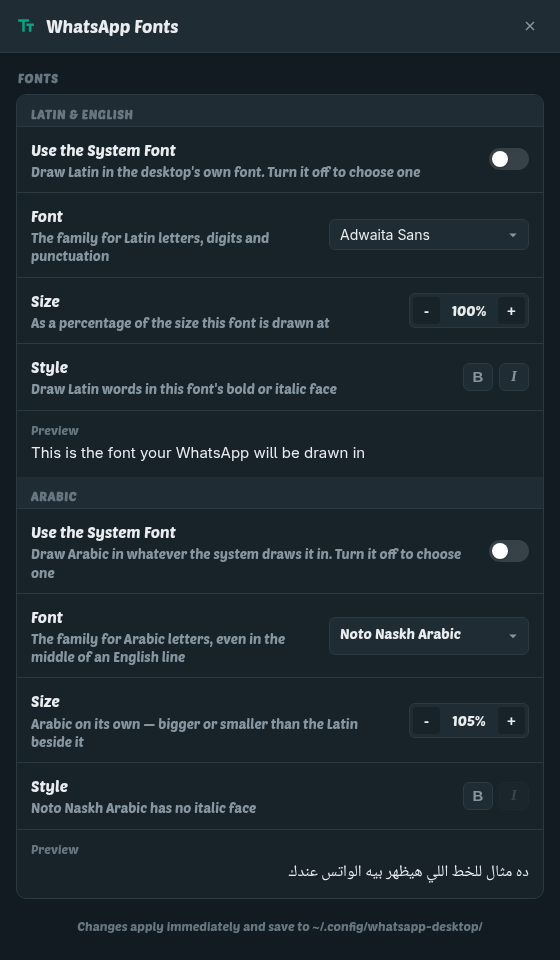
Every family the page names gets two faces: one with no range, and one whose range is the Arabic blocks. Both match an Arabic character, both have the same weight and style, and CSS breaks that tie by declaration order — the last one wins. So the Arabic face is written second, and moving it is a bug rather than a tidy-up.
The rest of it rides on the same descriptor. Per-script size is size-adjust,
which scales the glyphs and the metrics of one face, so Arabic can be drawn a
size up from the Latin beside it in the same line — worth having, because Arabic
sits smaller than Latin at the same nominal size in almost every pairing.
Bold is a different file, never a declaration. Chromium synthesises a bold only
when the page asks for a weight the family has no face for, and this page asks
for 400 — so "bold Arabic" means src: local("<the family's bold face>"),
resolved from fc-list. A family with no bold face cannot be made bold, and the
window greys that button and says so in the row rather than offering a switch
that does nothing. The Arabic list is filtered the same way: only families that
can actually draw the script, so nothing on it comes out as boxes.
How notifications work
This is most of the code, and until recently all of it was guesswork.
WhatsApp Web is a page. The obvious way to know what has happened in it is to
watch what it draws: a row moves to the top of the chat list, so something
arrived; an unread pill goes away, so something was read; an @ badge is on a
row, so that message was addressed to you. Each of those is an inference about a
picture drawn for a person, and each of them was wrong in a way that eventually
showed:
- the
@badge stays on the row until the mention is read, so every ordinary message that followed one into a muted group was announced as though it were addressed to you; - the pill is redrawn on WhatsApp's own clock, so "read on the phone" arrived seconds late — behind an observer's debounce, a grace period and a sweep — and did not arrive at all with the window in the tray, because a hidden renderer does not repaint a list nobody is looking at;
- nothing in a chat list can say that a message which was there has gone, so a message deleted for everyone left its notification behind for good.
None of it has to be guessed. contextIsolation is off for the main window, so
the page script shares WhatsApp's own world, and window.require is Meta's
module registry — require('__debug').modulesMap lists 16,866 modules on the
build I measured. The collections behind the interface are ordinary
Backbone-shaped models with events on them, and every question this client asks
has an answer WhatsApp is already computing:
| what is asked | what answers |
|---|---|
| a message arrived | MsgCollection add, with its type, its author and its mentions |
| it was read | ChatCollection change:unreadCount |
| which chat is on screen | ChatCollection change:active |
| it was deleted for everyone | MsgCollection change:type → revoked |
| somebody reacted | ReactionsCollection, keyed by the message reacted to |
The read signal is the one worth a number. Measured against a live account:
change:unreadCount fires 16 milliseconds after the arrival it belongs to,
and again the instant the message is read — on the phone, here, or on another
desktop; WhatsApp does not say which and it does not matter. There is now no age
guard anywhere in the withdrawal path, because a guard belongs in front of a
guess and none of these is one.
Three rules that are less obvious than they look:
- A banner comes down on the client's own clock. GNOME shows one at a time, queues three behind it and drops the rest, and a banner parked under an idle mouse pointer swallows every message that follows it. Each one is closed after twelve seconds and posted again at low urgency, which files it in the notification centre without a banner and without a sound. Nothing is lost and nothing blocks.
- Reading part of a conversation withdraws part of it. WhatsApp counts the messages still waiting, and the ones it is counting are the last ones in the chat — so five unread becoming two means the oldest three have been read, and all but the newest two come down. That needs nothing from the read side but a number.
- A notification is identified by its message, and keyed by its chat's id. Not by what it says: two identical sentences hash the same, which cost a genuinely repeated message its banner. Not by a display name either — two chats can share one, and on the account I develop against three pairs do.
WhatsApp's own notification settings are honoured rather than re-invented, and
they are granular: there is a switch for reaction notifications under Messages
and a separate one under Groups, and "only messages that mention me" is a third.
Each is read at the moment of the decision, and each is an and with the
client's own setting — the client's switch stays the master, because it is the
one in the window you opened to turn notifications off.
There is no tone for the messages you send, and none for a message that lands in the conversation you are already looking at. The bubble was drawn under your eyes as it arrived; there is nothing left for an announcement to tell you.
None of this is believed. Those are private module names and they will not be
private for ever. Every lookup happens inside a try, every answer is checked
rather than trusted, and a store that does not resolve leaves the old chat-list
watcher exactly where it was, running the client the way it ran before any of
this existed. The test suite drives that path deliberately: it hands the page
script a world with no window at all, so the store never resolves and the
fallback is what gets exercised.
Voice, video calls, and screen sharing
Calls ring, are answered, and share a screen, with the laptop's own camera and microphone. Four things had to be arranged for that.
- Permissions, once and narrowly.
audioCapture,videoCapture,speaker-selectionanddisplay-captureare granted to WhatsApp's own origin and refused to every other, in both the request handler and the check handler. Nothing asks the user first, and nothing else in that session can ask at all. - Screen sharing.
navigator.mediaDevices.getDisplayMedia()is answered by Electron'sdesktopCapturerand the stream handed to WhatsApp, which puts Chromium's ownWebRTCPipeWireCapturerunder it on Wayland — so the picker is the desktop's, and windows are offered as well as whole screens. - WebGPU is off, deliberately. Chromium on Linux under Wayland and Mesa has a
broken
CreateExternalTexturefor video elements: it fails silently withInvalid ExternalTexture, and WhatsApp's video-effect pipeline then renders a black 1280×720 rectangle where the camera should be. Turning WebGPU off puts it back on the WebGL and direct-MediaStream path that works. - The silencer never touches a call. The code that stops WhatsApp playing its
own notification tone leaves
<video>elements, WebRTCMediaStreams, the call dialogs and voice-note audio alone — muting a call to silence a notification is a bug that is very easy to write once.
Scrolling and the display server
Chromium decides GPU rasterisation per driver, from a blocklist years out of date on Linux, so it is overridden and asked for explicitly; smooth scrolling is a separate switch, on by default in Chrome and off in a bare Electron. The conversation's message list is put on a compositor layer of its own, scoped to that one element so the rest of the page does not pay for it.
The client also asks for Wayland natively rather than XWayland — the difference
between crisp text at a fractional scale and a blurry upscale, and between smooth
trackpad scrolling and stepped wheel events. It works out which one it is on from
both XDG_SESSION_TYPE and WAYLAND_DISPLAY, because the first is inherited
from the login session and is simply missing when a launcher does not pass the
whole environment on, and it prints the answer at startup.
There are deliberately no custom scrollbars. A single ::-webkit-scrollbar rule
takes a scroller off Chromium's composited scrollbar path and puts it back on
the main thread, and a prettier scrollbar is not worth frames on the one surface
that has to move smoothly.
The reply bar
Click Reply and a bar carrying the quoted message rises over the composer, and the conversation above it makes room. Sampled every frame on the live page, neither half was smooth and they were not even the same motion: the bar grew from nothing to its full 67px between 83ms and 156ms, and the messages behind it did not move at all until 168ms — then jumped 66px in a single frame. Closing was worse: 225ms of nothing, then a collapse over 66ms with the room coming back in two jumps.
They are two halves of one motion run by two things that do not keep step. The bar's height is written inline every frame by WhatsApp's own animation library; the conversation's is a resize watcher that answers two frames later.
Both are taken over. The panel is pinned at the height it needs, the quoted message is parked a bar-height below it out of sight, and in the very frame the conversation shrinks the messages are pushed back down by exactly as far as they moved — then both are released together. Nothing but a transform moves after that.
Two measurements decided how, and neither was guessable. An animation started
with element.animate() does not take effect until the next frame, because
animation effects are folded into style once a frame, before the callbacks
that would create them — so pinning a height that way and forcing layout in the
same task gives you the old height back. And the follower runs from a
ResizeObserver, which fires after that point, so an animation started there
would leave the messages 66px out of place for exactly the frame that matters.
Both halves are CSS transitions instead, with a forced read between the offset
and the release: without it the two writes land in one recalculation, and a
transition from nought to nought does not run.
Measured after — five opens and closes, plus one of each from a conversation scrolled up into: the last row travels its 66px in 21 to 23 steps, and no frame moves it further than the easing calls for.
Memory
Signed in, seventy-one chats, freshly started and sitting on the chat list, summed PSS across every process:
renderer (the WhatsApp page)   584 MB
main process                   125 MB
GPU and zygotes                169 MB
network and audio services      49 MB
-----------------------------------
total                          937 MB
Where that sits is worth knowing: 639 MB of the renderer is WhatsApp's own JavaScript heap, DOM and decoded images, against 59 MB for the Electron binary and its resources. The weight is the page, not the shell around it. On the same laptop at the same moment, VS Code was using 2.1 GB and GNOME Shell 920 MB.
And on the same signed-out page, one tab each: Zen 353 MB, whatsapp-desktop 247 MB. A browser carries a browser — its UI, its extensions, its history, its sync. This carries one page.
Installing it
Every command below, plus the by-hand key and repository steps for each package manager, is also on the client's own page — abdallah-shehawey.github.io/whatsapp-desktop, which reads its download links straight off the newest release.
From the shinux repository:
sudo dnf install whatsapp-desktop     # Fedora and friends
sudo apt install whatsapp-desktop     # Debian, Ubuntu 24.04+
sudo pacman -S whatsapp-desktop       # Arch, with the repo added
Packages are also attached to every
GitHub release
— .rpm, .deb and a native Arch .pkg.tar.zst.
The package installs a system-wide autostart entry, so the client starts hidden
in the tray at login. If you would rather it did not, turn it off in Settings →
Applications → Startup, or delete
/etc/xdg/autostart/io.github.shehawey.whatsapp-desktop.desktop.
Building it yourself needs Node and nothing else:
make            # fetches Electron
make install    # ~/.local, plus a desktop entry and icons
make autostart  # also start hidden at login
make test       # replays a chat list past the watcher, no browser needed
make screenshots # re-photographs the three windows above
Why not Zen, or Firefox
This is the first thing I get asked. Gecko has had no embedding API since XULRunner was retired, and GeckoView is Android-only — there is no way to put Firefox's engine inside an application the way Electron carries Chromium's. The only route is to ship a whole Firefox, locked to one site.
That costs the two things this client is for. Firefox has no tray, and nothing outside a Wayland client can hide its window, so close-to-tray goes. And Firefox raises its own notifications, which means no sender's picture, no click that opens the conversation, and no control over how long a banner stays — which is the entire notification story above.
The source
github.com/abdallah-shehawey/whatsapp-desktop, GPL-3.0-or-later, with a landing page at abdallah-shehawey.github.io/whatsapp-desktop if you would rather hand somebody a download link than a repository.
It installs alongside the C client rather than over it: two separate packages with separate state directories, so you can run both, and removing one leaves the other untouched.

Comments
Loading the discussion…